
HP OmniPad 12 review: Android tablet that wants to replace your laptop
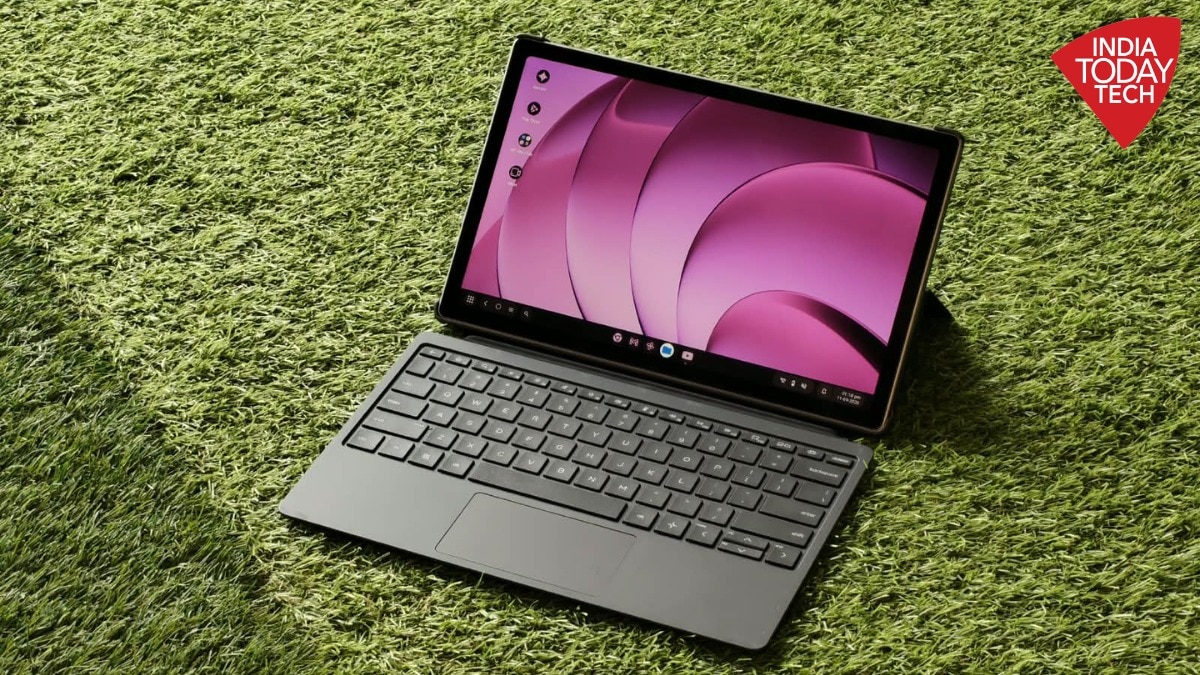
Usually, HP needs no introduction. It is one of the biggest makers of laptops and PCs, but it is not every day you see it launching an Android tablet. The HP OmniPad 12 is not the company’s first Android tablet – HP released a bunch of Android devices back in the day – but it is coming after a long time. And the OmniPad 12 enters a market which is quite crowded – with devices like the Xiaomi Pad 8 and the Oppo Pad 5.
HP seems to have done its homework. The company is not pitching the OmniPad 12 as a regular Android tablet. Instead, it is focusing on productivity. At a time when laptops – and consumer devices in general – are getting expensive, HP is pushing the OmniPad 12 as a device that can do almost anything your laptop can, with a starting price of Rs 48,999. But does it deliver? India Today Tech spent some time with the OmniPad 12 and here are our thoughts.HP OmniPad 12: Design and build
The OmniPad 12 stands out the moment you first look at the device. The tablet has an aluminium build which feels quite premium to hold. The HP logo sits prominently at the centre, which may look a bit big to some, but we feel, adds to the whole work aesthetic. The main camera sits on the top left of the chassis. The OmniPad comes with an aluminium build that feels premium. At a thickness of 7.3mm, the HP OmniPad 12 does not feel too thick in the hand. Though at 600 grams, it is not the lightest tablet out there – the Xiaomi Pad 8 weighs under 500 grams. While the OmniPad 12 does not feel bulky, the weight may bother you if you are holding the tablet for longer sessions.
The OmniPad 12 gets a quad speaker setup – two on the top and two on the bottom. The power button is placed on the top, while the volume keys are on the right side. Though there is not a lot of space separating the two volume keys which may sometimes cause accidental clicks. You also get a headphone jack – something we don’t really see nowadays.
The tablet also comes with a case and keyboard in the box which saves you some money. The case connects to the device via pogo pin connectors on the back.HP OmniPad 12: Display
Now, let’s turn our attention to the front. The OmniPad 12 features a 12-inch 2K IPS display with a 90Hz refresh rate. Some may find the bezels to be too thick for a tablet at this price – HP says it has an 85 per cent screen-to-body ratio. However, the screen is large enough and the bezels help avoid any accidental touches when you hold the OmniPad 12. The OmniPad 12 comes with a 2K IPS display.
According to HP, the OmniPad 12 covers 100 per cent of the sRGB colour gamut. This can help those who do some photo editing or graphic design. However, do not expect to be able to use the entire DCI P3 gamut for more intense projects.
The 2K resolution has a per-pixel density of 240, which is not bad. In practice, the screen looks quite crisp, be it while typing documents or scrolling webpages. It has a peak brightness of 400 nits which is fine while working indoors or at home. But you may find the screen to be a bit glary under direct light.
The display on the OmniPad 12 has an aspect ratio of 16:10. This means that while watching content, you will likely see smaller black bars than something like an Oppo Pad 5. Pair that with the quad speakers, and you get a good setup to watch content. Though, while you can play 4K videos on YouTube, there is only Widevine L3 support – SD – for Netflix.
Nevertheless, the video streaming experience is quite good. You don’t see a blueish tone on the display that is usually the case with IPS panels. And the speakers – while not as good as those on the Oppo Pad 5 – are quite loud and clear.HP OmniPad 12: Performance and user experience
Under the hood, the HP OmniPad 12 uses Qualcomm’s Snapdragon SM6475Q. Or in simpler terms, it uses the Snapdragon 6 Gen 3 but with two less cores. For context, the Xiaomi Pad 8 – which is currently available for around Rs 40,000 – uses the Snapdragon 8s Gen 4. But specs don’t tell you the whole story. The OmniPad 12 uses a Snapdragon 6 series chipset.
While setting up the OmniPad 12, I found the entire process quite seamless. The device runs on an almost stock Android skin, based on Android 16. The UI is quite simple, something that you may appreciate as it has less clutter compared to other skins. But there are some pre-installed apps, like Brands.live and Microsoft OneNote, which cannot be uninstalled.
The OmniPad 12 can handle daily tasks well. If you want to browse webpages, write documents on Google Docs, or watch some videos, the tablet will do the job. There is also a dedicated Desk mode which makes it almost like a mini laptop. We found that the OmniPad 12 was able to multitask – have X, WhatsApp, multiple browser tabs open at the same time – quite well in such a scenario.
However, the tablet is not a powerhouse. On some occasions, you may notice jitters in the UI, which is not expected at this price. There are also some bugs, which we hope HP fixes with software updates. And while you can do gaming on the OmniPad 12, you may want to stick to lighter games.
You can find the benchmark scores for the OmniPad 12 below: Benchmark scores for HP OmniPad 12. advertisementHP OmniPad 12: Battery and everything elseBut what about battery life? The HP OmniPad 12 uses an 8,133 mAh battery. During our review, we found that the OmniPad 12 can deliver quite decent battery life. On most occasions, if you use the tablet for lighter workloads as we discussed, you can easily get 7-8 hours of screen-on time. Here is how you can use the HP OmniPad 12 in desk mode while using the keyboard and the case you get in the box.
During a recent event launch, I used the OmniPad as my secondary device – keeping track of the event and X feeds. Even after 3 to 4 hours, the battery life had only dropped around 25 per cent. Of course, if you try to use more intensive apps or play games, you can expect more battery drain. But overall, as tablets usually are, the battery life is not bad.
On the charging front, HP ships a 33W charger in the box with the OmniPad 12. It takes under 2 hours to fully charge the device. Speaking of the box, the OmniPad 12 comes in a brown cardboard box that may remind you more of laptops than Android tablets – perhaps that was the point.
The box also contains the case and the keyboard. The case feels solid and has a nice soft-touch feel at the back which feels premium. You can use it as a kickstand too. The keyboard, while it appears quite thin, is quite enjoyable to type on, as far as tablet keyboards go. You also get dedicated buttons for switching between desk and tablet modes, as well as an HP programmable key to open one of the pre-installed apps.
Cameras often go overlooked when it comes to Android tablets. In this case, the HP OmniPad 12 uses a 13-megapixel main sensor, paired with an 8-megapixel selfie shooter at the front. These sensors are enough for some occasional shots, document scanning, or video calls. They can also record up to 1080p videos at 30FPS.HP OmniPad 12 verdict: Should you buy it?
So where does the HP OmniPad 12 stand? The device takes a slightly different approach compared to other Android tablets. And this approach works despite having a few quirks. If you are someone who is looking for a device for work or college, the OmniPad 12 could be your pick instead of opting for a traditional laptop. The OmniPad 12 is a premium device that can handle your everyday tasks.
The tablet can multitask well when it comes to things like documents, presentations, online meetings, and more. You can also do some photo editing. On top of that, there is a nice touchscreen, something you simply don’t get on a laptop at this price. However, for those who may just want an Android tablet for personal use or gaming, there are better options out there. While HP’s return to Android has ticked quite a few of the right boxes, there is some room for improvement.- EndsPublished By: Armaan AgarwalPublished On: Sep 14, 2026 13:31 ISTAlso Read | Oppo Pad 5 review: Large screen and premium design steal the showAlso Read | Xiaomi Pad 8 review: Best tablet under Rs 40,000?Also Read | Poco X8 Power review: Good looks and monster battery in one package


